makima
a wireguard mesh you own end to end — its own control plane, direct encrypted paths, and no accounts or server but the one you run.
- Version
- v0.4.4
- oct 16, 2026
- Stars
- 1
- on GitHub
- Category
- go
- Developer
- justin06lee
- Language
- Go
- License
- MIT
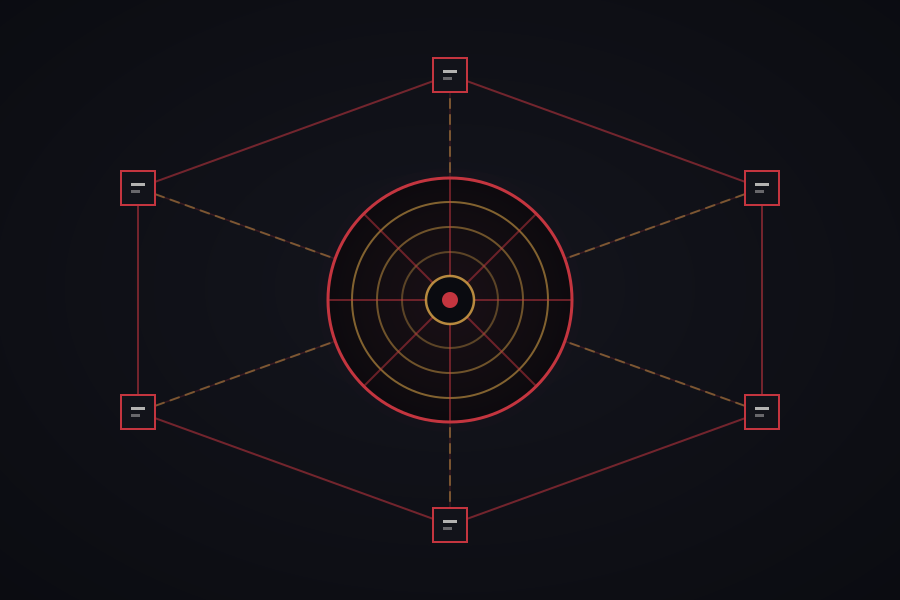
A mesh network you own end to end. Every machine you have on one flat address space — no accounts, no third party, no coordination server but your own.
makima is a WireGuard mesh with its own control plane. You run the coordination server, you run the relay, and no packet or key ever touches infrastructure you do not administer.
It is built the way Tailscale is built, because that architecture is right: a central service that decides who may talk to whom, and direct encrypted paths that carry the traffic without passing through it. How it fits together draws it: gold chains from the centre to every node, crimson paths straight between them.
What’s New
Version HistoryVersion 0.4.4oct 16, 2026
Install or update
curl -fsSL https://raw.githubusercontent.com/justin06lee/makima/master/dist/install.sh | sh
Update every machine, the one holding the network first.
Steadier connections
- A brief Wi-Fi drop that comes back on the same network no longer resets every connection.
- Direct IPv6 connections between machines.
- The server tells machines its current home address: at home nothing goes through tor, and the machine holding the network talks to its own server locally. A stale server address fixes itself.
- Only one makima runs at a time; an update no longer leaves a stray second copy behind.
- Internal-only network addresses (the Jetson USB bridge, VM and container bridges) are no longer advertised.
Full Changelog: https://github.com/justin06lee/makima/compare/v0.4.3...v0.4.4
Show version historyHide version history
Version 0.4.3oct 14, 2026
Install or update
curl -fsSL https://raw.githubusercontent.com/justin06lee/makima/master/dist/install.sh | shWhat's changed
makima possessasks justhuiyunlee's password:— no address, nomakima-…ID in the prompt. makima asks on ssh's behalf, with the typing hidden as usual, and hands what was typed straight to ssh.- No more
Permanently added 'makima-…' to the list of known hostson first contact. A host key that really changes still warns. makima reset's tests no longer reach the real/var/lib/makima-tor.
Full Changelog: https://github.com/justin06lee/makima/compare/v0.4.2...v0.4.3
Version 0.4.2oct 14, 2026
Install or update
curl -fsSL https://raw.githubusercontent.com/justin06lee/makima/master/dist/install.sh | shRun it on every machine — the one holding the network included, since it is the one that passes each machine's owner on to the others.
What's fixed
- No more "REMOTE HOST IDENTIFICATION HAS CHANGED" from
makima possessafter a network is started over. Host keys are remembered per machine (by its node key, asmakima-…in~/.ssh/known_hosts), not per address — addresses are handed out again. A host key that really changes on the same machine still warns. makima possesslogs in as the other machine's owner by default. Every machine now tells the network whose it is, so a shell from a Jetson to a Mac asks for the Mac account's password, not one for an account named after whoever is typing. Before ssh asks, it says whose password it wants;makima possess NAME@machinepicks another.- A machine that takes no ssh at all now says so, and how to switch it on, instead of "Connection refused".
Full Changelog: https://github.com/justin06lee/makima/compare/v0.4.1...v0.4.2
- No more "REMOTE HOST IDENTIFICATION HAS CHANGED" from
Version 0.4.1oct 14, 2026
Install
curl -fsSL https://raw.githubusercontent.com/justin06lee/makima/master/dist/install.sh | shWhat's new
- The desktop app is in the release, and the installer puts it in place:
/Applicationson Apple Silicon Macs, and through apt on Debian and Ubuntu desktops (amd64 and arm64, built on 22.04 — Jetsons included), which brings tor along. Servers with no desktop get the binaries alone;MAKIMA_APP=0/MAKIMA_APP=1override that. - Run the installer again to update. What was running is stopped for the replacement and started again, the way
makedoes it. - The release's app shows initials rather than device faces; a build from source still has them.
- Intel Macs and Linux without apt get the binaries alone, and build the app from source.
Full Changelog: https://github.com/justin06lee/makima/compare/v0.4.0...v0.4.1
- The desktop app is in the release, and the installer puts it in place:
Version 0.4.0oct 14, 2026
Install
curl -fsSL https://raw.githubusercontent.com/justin06lee/makima/master/dist/install.sh | shDownloads the archive for this machine, checks it against
SHA256SUMS, and putsmakima,makimad,makima-serverandmakima-relayin/usr/local/bin. Thenmakima up. For reaching the network from anywhere, install tor too (sudo apt install tor/brew install tor). The desktop app is not in this release; build it from source.What's new since v0.3.0
- Reach the network from anywhere through tor. The machine holding the network publishes it as an onion service: no port forward, no public address, works behind CGNAT. Only coordination goes over tor; WireGuard traffic stays direct. DuckDNS is gone.
makima resetstarts a machine over, and a machine can take itself off the network.- Desktop app: a monochrome look, device faces, first-run setup that can take over a network, and Linux support (tray, .deb/.rpm packaging).
- Network lock: signatures are bound to one network, the signing key can be rotated, and signing follows the signed history rather than the server's word. Machines still on v0.3.0 keep working with upgraded peers.
- Expired machines leave every netmap; rate limits behave behind reverse proxies; DNS, port-mapping, exit-node and policy fixes.
makeinstalls Go from go.dev when it is missing or too old.
Full Changelog: https://github.com/justin06lee/makima/compare/v0.3.0...v0.4.0
Version 0.3.0sep 24, 2026
Full Changelog: https://github.com/justin06lee/makima/compare/v0.2.0...v0.3.0
Information
- Developer
- justin06lee
- Category
- go, self-hosted, p2p, encrypted
- Language
- Go
- License
- MIT
- Updated
- oct 16, 2026
- Year
- 2026
- Source Code
- github.com/justin06lee/makima